Last updated: October 4, 2026
A silicone cleansing brush can look nearly maintenance-free, but it still collects facial oil, sunscreen, makeup, cleanser residue, and dead skin between its soft touch points. If you rinse it poorly or store it while damp, residue can create an unpleasant odor and give bacteria and mold a place to grow. Harsh cleaners, boiling water, and abrasive scrubbing can also damage silicone or weaken the device’s seal.
The good news is that routine care takes only a few minutes. The method below works for rechargeable silicone facial brushes, including models with vibration or a warming massage end. Always check your device’s instructions first, especially before exposing it to water or cleaning near a charging port. A simple cleaning routine helps your brush stay fresh, comfortable, and ready for daily use throughout 2026.
As an Amazon Associate we earn from qualifying purchases at no extra cost to you.

What You Need
| Item | Why | Optional? |
|---|---|---|
| Lukewarm water | Rinses away cleanser, oil, and loose debris without stressing the silicone | No |
| Mild, fragrance-free liquid soap | Breaks down facial oil and product buildup | No |
| Clean, soft toothbrush or small detailing brush | Helps clean seams, grooves, and charging-port covers | Yes |
| Lint-free towel or clean microfiber cloth | Removes surface water without leaving fibers behind | No |
| Cotton swabs | Useful around buttons, seams, and protected charging areas | Yes |
| Small bowl | Provides a controlled place to mix diluted soap and water | Yes |
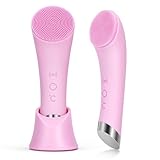
Do not use bleach, acetone, alcohol-based solvent, glass cleaner, abrasive powder, or rough scrub pads unless the manufacturer specifically approves it. These products may dry out the surface, discolor it, or damage nearby plastic and seals. For an affordable replacement or second brush, rechargeable options such as the PRITECH Silicone Face Scrubber with Heat Massage End and the pink PRITECH Facial Cleansing Brush are listed at about $10 each. Their waterproof design still does not mean every part should be submerged indefinitely, so follow the care instructions supplied with the individual brush.
Step-by-Step
Turn the brush off and disconnect it — 30 seconds
Press the power button until the brush is completely off. Disconnect the charging cable and remove any detachable accessories. Never clean an active vibrating brush, and do not place a plugged-in device near a sink or bowl of water.
If the brush has a warming massage end, allow it to cool to room temperature before washing. Heat can make leftover cleanser or oil more fluid, but cleaning a warm electrical device is unnecessary and may increase the risk of moisture entering a seam.
Inspect the charging area and controls — 1 minute
Look for a charging port, rubber cover, button seam, or connection between the silicone body and plastic housing. Close any protective port cover if the instructions say it should remain closed during rinsing. If the port is exposed, keep it facing away from the water stream.
Check for peeling silicone, cracks, a loose cover, or a housing that has separated. If you see damage, skip a full rinse and go to the replacement guidance below.
Rinse off loose residue — 30 to 60 seconds
Hold the silicone surface under lukewarm running water. Rotate the brush so water reaches the bristles, grooves, and edges. Use your fingers to gently loosen visible cleanser, makeup, or skin oil.
Avoid very hot water. Temperatures that feel uncomfortable on your hand can gradually affect adhesives, seals, and plastic components. Cold water is safe but may not loosen oily residue as effectively.
Wash with a small amount of mild soap — 1 to 2 minutes
Apply one or two drops of mild liquid soap to the silicone surface, or dilute the soap in a small bowl of lukewarm water. Massage the surface with clean fingers, paying special attention to the thicker touch points and any textured massage area.
For stubborn residue, let the soapy solution sit on the silicone for about 60 seconds. Do not leave the entire device soaking unless its instructions specifically permit immersion. Rechargeable brushes contain electronic components that can be affected by water even when the outer body is designed for bathroom use.
Clean grooves and seams carefully — 1 minute
Use a soft toothbrush or detailing brush to sweep across grooves with light pressure. Work in short strokes rather than scrubbing aggressively. A cotton swab lightly dampened with soapy water can help around a button or seam.
Do not push a cotton swab, toothpick, needle, or other object into a charging port. If residue is packed inside the port, stop using the brush and follow the manufacturer’s cleaning or service instructions.
Rinse until no soap remains — 30 to 60 seconds
Rinse the silicone thoroughly with lukewarm water. Run your clean fingers over the surface to check for a slippery film. Soap left behind can irritate skin and attract more dust or residue during storage.
Keep the water directed at the silicone cleaning surface rather than the charging connection. If the manual recommends wiping instead of rinsing, use a clean damp cloth and remove all soap with several passes.
Dry every surface — 2 to 5 minutes
Shake off excess water, then pat the brush dry with a lint-free towel. Wipe around the buttons, seam, handle, and warming end. Gently squeeze or flex the silicone only as much as needed to remove trapped water; do not twist the device.
Leave the brush in an open, well-ventilated spot with the silicone surface facing upward or outward. Allow it to air-dry fully before placing it in a drawer, travel case, or charging cradle. Drying usually takes a few minutes, but a device with deep grooves may need longer.
Store it away from moisture — 1 minute
Once completely dry, store the brush somewhere clean and ventilated rather than on a constantly wet shower ledge. Keep it away from loose cosmetics, used washcloths, and direct sunlight. Do not charge it while it is wet.
For travel, use a clean case with ventilation or leave the case open until the brush is dry. Wipe the case regularly because a clean brush can become dirty again when placed inside a damp container.
Mistakes to Avoid
- Using boiling or very hot water: Excess heat can affect seals, adhesives, and plastic parts.
- Soaking the whole brush: A waterproof label does not necessarily mean unlimited immersion or safe submersion with the charging port open.
- Using abrasive tools: Scouring pads, nail brushes, and powder cleaners can roughen silicone and make it harder to clean.
- Applying strong chemicals: Bleach, solvents, and concentrated disinfectants may damage the surface or leave irritating residue.
- Charging immediately after washing: Moisture near a charging connection can cause malfunction or corrosion. Wait until the device and port are fully dry.
- Storing it face-down while wet: Water can remain trapped in grooves and under the device.
- Ignoring a smell: A persistent odor may signal trapped product buildup or damage. Repeat a thorough wash and drying cycle; replace the brush if the odor remains.
How Often
Rinse the silicone surface after every use, even if you used only a small amount of cleanser. Wash it with mild soap at least once a day when using the brush daily. If you use heavy sunscreen, makeup-removing balm, facial oil, or a rich cleanser, wash it after each use.
Give the brush a more careful seam and groove inspection once a week. Clean its case weekly as well. Avoid sharing a cleansing brush, since regular cleaning does not eliminate every hygiene concern between users.
When to Call a Pro or Replace
Most silicone cleansing brushes are more practical to replace than repair. Stop using the device if the silicone splits, the housing opens, the charging area becomes loose, or water appears behind the surface. Also stop if it becomes unusually hot, emits a burning smell, sparks, swells, or starts vibrating unpredictably.
Contact the manufacturer or an authorized service provider for questions about a damaged rechargeable unit. Do not open the housing yourself, especially while the battery is installed. Replace the brush if the silicone remains sticky, cracked, permanently discolored, moldy, or odorous after cleaning. A replacement commonly costs roughly $10 to $40, depending on features such as heat, multiple speeds, accessories, and battery capacity; the two PRITECH examples above are priced at about $10.
FAQ
Can I clean a silicone cleansing brush with facial cleanser?
Yes, in a pinch, but mild liquid soap is usually better at removing oily residue. Rinse thoroughly afterward. Avoid cleansers containing exfoliating grains, acids, or heavy oils because they can leave residue or work into grooves.
Can I put my cleansing brush in the dishwasher?
No, unless the manufacturer explicitly says it is dishwasher-safe. Dishwasher heat, detergent, and prolonged water exposure can damage silicone, electronics, seals, and the battery housing.
How do I clean a brush that smells bad?
Wash it with mild soap, rinse carefully, and air-dry it completely in a ventilated place. Repeat once if necessary. If the smell returns or seems to come from inside the housing, replace the brush rather than applying bleach or perfume.
Can I use rubbing alcohol to disinfect it?
Do not use rubbing alcohol unless the manufacturer approves it for that specific model. Alcohol may affect silicone, printed markings, plastic, or seals. Regular washing after each use and complete drying are the safer routine for most household facial brushes.